


Ruhavik — Analyze your trips
4.518.00 Reviews
App Specs
- Version
- Varies with Device
- Updated On
- License
- Free
- Downloads
- 500,000+
- Developer
- GURTAM RnD
- Categories
- Auto & Vehicles
- Platform
- Android
Screenshots
 Analysis by AppCompare
When a trip-analysis app seems empty or inconsistent, the first question is usually not what the charts mean but where its information comes from. Ruhavik — Analyze your trips is intended to make journeys easier to review, yet its usefulness depends on having a GPS tracker connected and sending trip data. That extra step is the main setup consideration: this is not simply a map app that can be opened once and expected to reconstruct every drive automatically.
I would start by checking that the tracker you plan to use is compatible and that it is actually reporting journeys before relying on the app for a routine. If you are evaluating it for a household or a work vehicle, test the complete path with one ordinary trip first: connect the tracker, travel a familiar route, then check whether the journey appears in the history. This small trial helps separate setup issues from expectations about what the app can show.
Where setup can become confusing
The requirement for a GPS tracker is easy to overlook if you are used to navigation apps that work directly from a phone. Ruhavik is focused on analyzing tracked journeys, so the tracker is part of the workflow rather than an optional detail. Before committing to it, I’d clarify which device will provide the location data and who will maintain that device. For a single driver, that may be straightforward; for a shared car, it can become a practical coordination issue.
There is also a difference between installing the app and having useful history. A newly connected setup cannot tell you much about earlier drives unless that information is available through the connected tracking arrangement. I would treat the first few journeys as a shakedown period: confirm that trips are recorded, compare the route with what you remember, and only then use the summaries to draw conclusions about habits or schedules.
Checks that make the first review more useful
When a journey is missing or looks odd, I would check the basics before assuming the analysis is wrong. Confirm that the tracker is connected, that it has had a chance to report the trip, and that the vehicle actually carried the tracking device for the whole journey. A route with gaps can be harder to interpret than a completely missing trip, because the partial record may look persuasive even when it does not reflect the whole drive.
It helps to use a familiar, repeatable route for an initial check rather than a long day of varied driving. That gives you a simple point of comparison: the start, destination, approximate route and stops are easier to remember. If the result differs, make one change at a time—such as checking the tracker connection—rather than changing several parts of the setup at once. That is a more reliable way to find the source of a problem.
Recovering a useful routine after a gap
If tracking pauses for a while, I would avoid treating the first trip after reconnecting as representative of a normal week. Confirm that new journeys are appearing, then build up a fresh run of everyday use before comparing patterns. Trip statistics are most helpful when the underlying records are complete enough to support the question you are asking; a gap in the record can make a comparison misleading.
Worth Reading Before You Choose

Flipboard Shows What News Apps Must Do Beyond the Feed

Switching to Android Auto Means Rethinking Your Driving Routine

Google Calendar Makes a Crowded Week Easier to Manage

Ludo King Makes the Most of the Minutes Between Plans

Baby Panda World Brings Quick Play to Modern Phones, but Its Game Library Feels Busy

ESPN’s Live Game View Makes Following Close Games Easier
A simple habit can prevent avoidable confusion: after a drive you care about, take a moment to check whether it has reached the history before you need it for a report or a conversation. This does not require constant monitoring. It is just a quick sanity check that the tracker and app are working together, especially after a device change or a period when the vehicle was not used.
Getting Started with Ruhavik
First things first, setting up Ruhavik was a breeze. Available for both Android and iOS, downloading the app was straightforward. Once downloaded, the app quickly guided me through the setup process. You’ll need to connect it to a GPS tracker, but don’t sweat it—there are plenty of options compatible with the app, and it only takes a few minutes to get everything synced up.
The user interface is clean and intuitive, which is a big plus if you’re like me and don’t have the patience for overly complicated apps. I immediately appreciated the simplicity and how everything was laid out.
A Deep Dive into Features
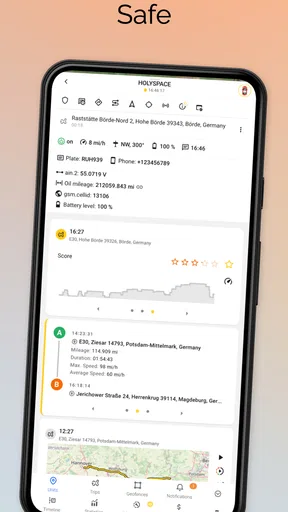
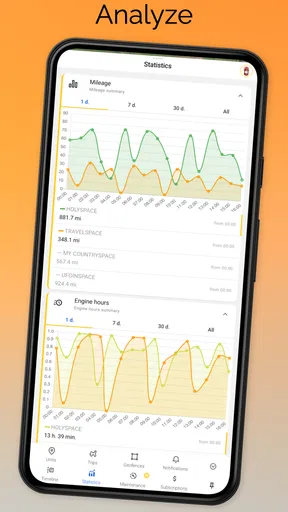
Now, let’s talk features. This app is packed with tools that help you analyze your trips in detail. It tracks your routes, speed, and distance with precision. But that’s just the tip of the iceberg.
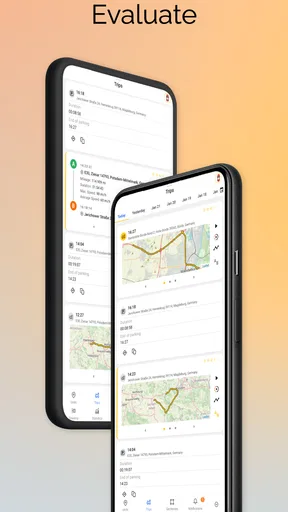
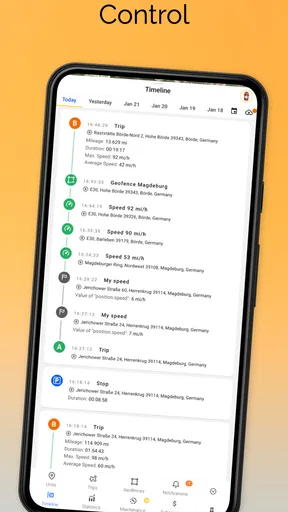
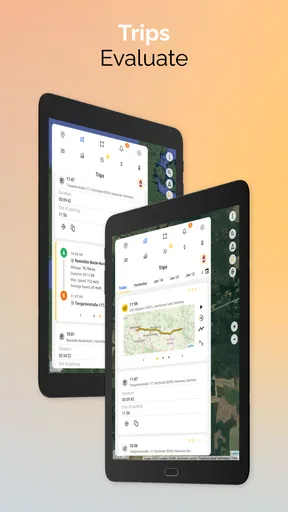
One of my favorite features is the trip history. It lets you view past trips and provides detailed statistics about each one. Imagine knowing exactly how much time you spent driving, how fast you were going, and how many stops you made. For someone who’s always on the go, this feature is a game-changer.
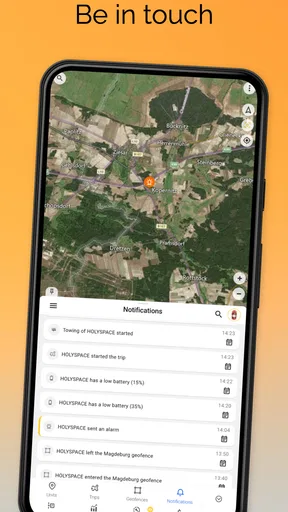
Another standout feature is the ability to create geofences. I set up a few around my usual routes, and the app notified me whenever I entered or exited these zones. It’s a neat feature, especially if you have kids or teens and you want to keep track of their whereabouts.
Usability and Performance
When it comes to usability, Ruhavik doesn’t disappoint. The app runs smoothly without any hiccups. During my testing, I didn’t encounter any crashes or bugs, which is always a relief. The data updates in real-time, so you’re never left hanging.
The app also performs well even in areas with spotty GPS signals. It manages to maintain a connection and provide accurate data, which is crucial for any trip analysis tool.
Why You Might Love It
If you’re a data enthusiast or someone who loves to have everything organized, this app could be your new best friend. It’s like having a personal assistant for your car. The insights it provides can help you improve your driving efficiency and even save on fuel costs.
For families, it’s a great way to keep an eye on everyone’s driving habits. Businesses with fleets can also benefit greatly from the detailed reports and geofencing capabilities.
Who gets the most out of it
I’d recommend it most to people who have a clear reason to review journeys after they happen: a driver trying to understand a regular commute, a family coordinating several drivers, or someone responsible for keeping an eye on vehicles. The useful question is not simply “Where did the car go?” but “What does the record show about this trip, and how does it compare with the usual pattern?” Trip history gives that question a practical starting point.
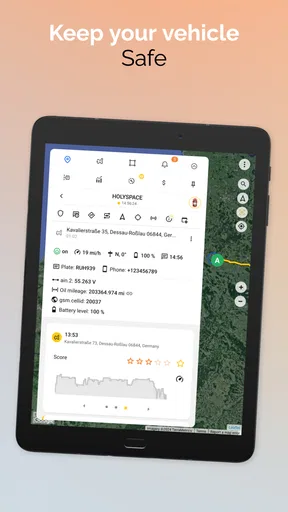
For example, imagine a parent checking whether a teenager’s drive home followed the expected route. A geofence can make an arrival or departure easier to notice, while the history offers context afterward. I would use those tools as a way to stay informed, not as a substitute for talking with the driver or as proof of every detail. Location records can support a conversation, but they do not explain why a stop happened or what conditions were like on the road.
Turning trip records into decisions
A useful way to work with the app is to choose one question before opening the history. If you are curious about a commute, compare several ordinary drives rather than drawing a conclusion from one unusual day. If you are reviewing stops, distinguish a recurring pattern from a one-off errand. This keeps the statistics from becoming noise and helps you focus on changes that could matter, such as a route that repeatedly takes longer than expected.
For a small business, the same discipline matters. A vehicle history may help a manager discuss routes or vehicle use, but it should be interpreted alongside the real work being done. A delivery run, a service call and a personal commute are not interchangeable journeys. I would first decide what the review is meant to answer, then use the relevant trip details instead of treating every recorded number as a performance score.
How it differs from ordinary navigation
Navigation apps are usually strongest while you are choosing a route and driving it. Ruhavik’s appeal is the after-the-drive view: routes and trip details are organized for review, and geofences can help mark places or boundaries that matter to you. If you mainly want turn-by-turn directions or live traffic choices, a navigation app is the more direct tool. If you want a record to inspect later, a tracker-based analysis app has a different purpose.
That distinction also explains who should skip it. Someone who drives occasionally, has no compatible tracker, or only wants directions may find the extra setup unnecessary. The app makes more sense when the value of reviewing trips outweighs the effort of connecting and maintaining the tracking source. It is not automatically better than a basic map app; it answers a different question.
Practical limits and sensible expectations
Trip data can look more exact than the circumstances behind it really are. A recorded route tells you where the tracking system placed the vehicle, but it cannot describe traffic, weather, roadworks or the driver’s reason for choosing a detour. I would avoid using a speed figure or a stop count in isolation to judge someone’s driving. The details are most useful as prompts for a closer look, not as a complete account of what happened.
There is also a trade-off between detail and attention. If you check every journey, the history can become a stream of information without a clear purpose. I’d set a modest review routine around a real need—perhaps checking a family arrival or looking back at a regular route—rather than making constant monitoring the goal. That keeps the app useful without turning ordinary driving into a reporting exercise.
Cost, audience and fit
Ruhavik is a free Auto & Vehicles app from GURTAM RnD, with a 4.4 average from around 4.8 thousand ratings and more than 500 thousand installs. It is rated for everyone, so the intended audience is broad, although the tracking context means adults should make thoughtful choices about how location information is used in a family or workplace. In-app purchases range from $0.99 to $399.99 per item, so I would check the current purchase details in the store before deciding whether any paid option suits your needs.
My practical advice is to start with the free experience and a specific use case, not with the assumption that more tracking is always better. Check whether your tracker connects, whether the trip records answer your question, and whether the history is easy enough for you to revisit. If those basics work, the app can provide a helpful layer of organization. If you need only occasional directions, the additional tracking workflow is likely more effort than benefit.
Final Thoughts
In a world where data is king, Ruhavik — Analyze your trips is a fantastic tool that empowers you with detailed insights into your driving habits. It’s user-friendly, packed with features, and offers real-time data that can genuinely make a difference. Whether you’re a casual driver or someone who spends a lot of time behind the wheel, this app is worth a try.
Ready to give it a spin? You can download it from the Google Play Store or the Apple App Store and start uncovering the secrets of your driving data today. Happy driving!
Pros
- User-friendly interface for easy navigation.
- Detailed trip analysis with comprehensive stats.
- Supports multiple vehicle tracking.
- Customizable alerts for various events.
- Offline mode for trip logging without internet.
Cons
- Limited integration with third-party apps.
- Free version has restricted features.
- Occasional GPS inaccuracies reported.
- Requires constant background activity.
- Battery consumption can be high on long trips.
FAQs for Ruhavik — Analyze your trips
What is Ruhavik, and how does it work?
Ruhavik is an app designed to analyze your driving habits and trips. It connects to your GPS tracking device to provide detailed insights on your driving patterns, routes taken, and fuel consumption. By analyzing this data, Ruhavik helps users improve their driving efficiency and safety.
Is Ruhavik compatible with all GPS devices?
Ruhavik supports a wide range of GPS tracking devices, but it's essential to check compatibility with your specific model. The app works best with GPS devices that can transmit data in real-time to ensure accurate and up-to-date analysis of your trips and driving behaviors.
How secure is my data on Ruhavik?
Ruhavik places a high priority on user data security. All data is encrypted and stored securely, ensuring only you have access to your personal information. The app adheres to strict privacy policies and regulations, so your driving data remains confidential and protected from unauthorized access.
Can Ruhavik help improve my driving habits?
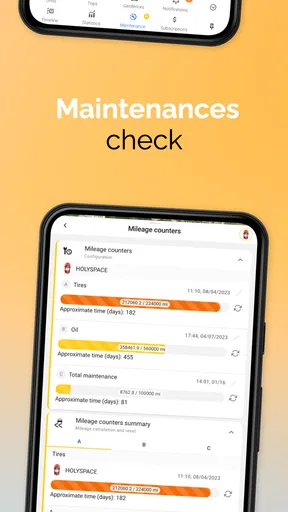
Yes, Ruhavik is designed to help users enhance their driving habits by providing detailed insights into their driving patterns. The app offers personalized recommendations based on your driving data, helping you to reduce fuel consumption, increase safety, and maintain your vehicle’s condition effectively.
Is Ruhavik available for both Android and iOS devices?
Ruhavik is available for both Android and iOS platforms, ensuring a wide range of users can access its features. You can download the app from the Google Play Store for Android devices or the Apple App Store for iOS devices to start analyzing your trips and improving your driving habits.


